Bible Coach
AI Bible study for the chapter you’re reading
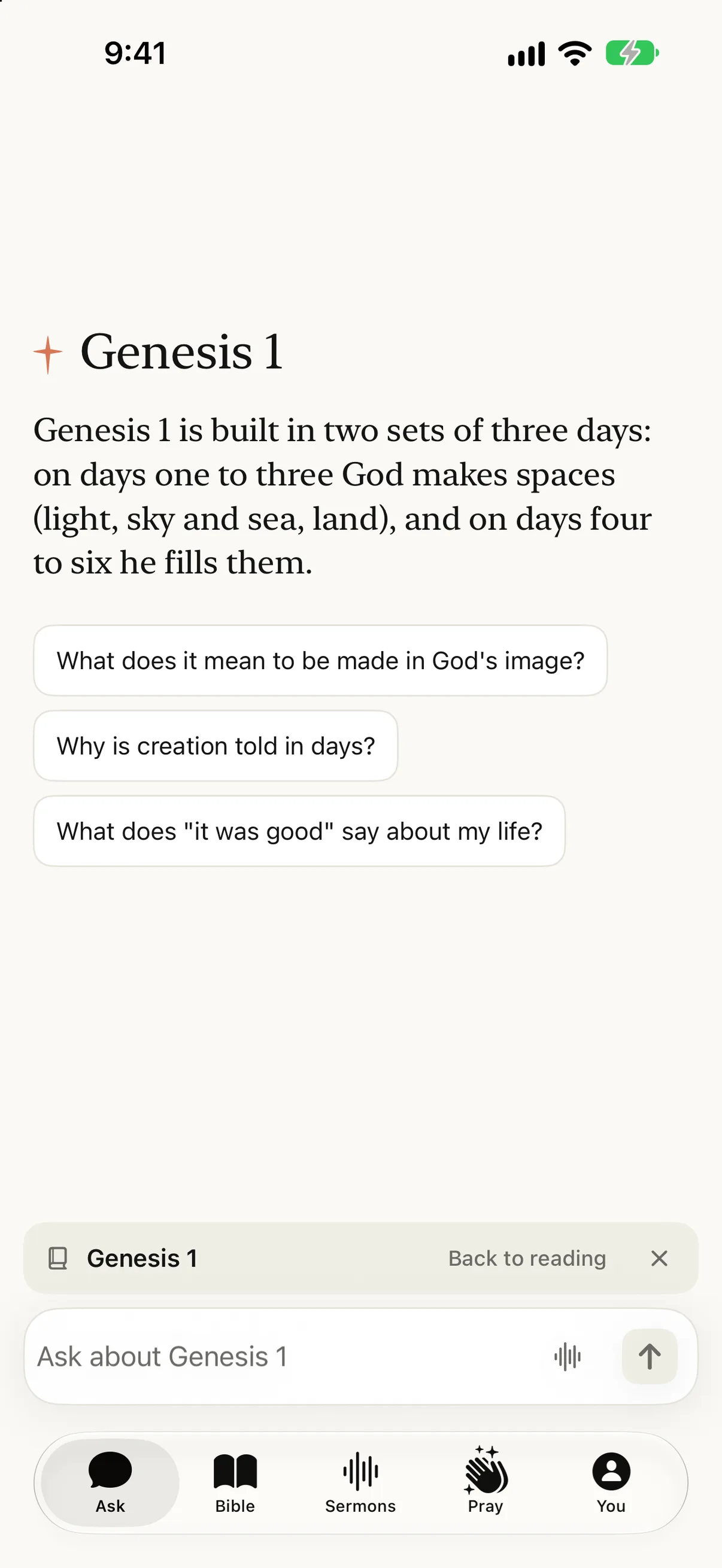
Open a chapter and ask about it. Lumin starts with something specific most readers miss, like how Genesis 1 is built in two sets of three days, and offers a few questions to follow. Every answer names the verses it draws on, and one tap takes you back to the chapter. It’s a study guide, not an AI pastor.
Free to start · iPhone and iPad · One tap back to the chapter
Comparing Bible AI tools in general? Read the Bible AI guide →
Inside the app
Bible Coach, on your phone.
Ask about any chapter. Lumin starts with something specific most readers miss, and the chapter stays open.
Lumin opens with one specific thing about the chapter, and Back to reading is one tap away.
Inside the chapter
What Bible Coach is
Many Bible chat tools start from a blank box. Bible Coach starts from the chapter you are reading: Lumin opens with one concrete thing about it, offers a few questions to follow, and answers about that chapter. The chapter stays pinned above the box, one tap back to reading.
Use it the way you might use a good study Bible or a friend who knows the background — to notice what you would have skimmed past, and to understand where a verse sits in the larger story.
Scripture first
The chapter stays one tap away (and stays the authority)
Every answer names the verses it draws on, and the chapter is one tap away, so you can check each answer against the text as you go. That matters. AI can help you study, but the text is the authority, not the explanation of it.
Where faithful Christians read a passage differently, Lumin lays out the main readings instead of picking a winner for you. Scripture on this site is quoted from the Lumin Translation; summaries are our own words, not a second Bible. See how we cite.
A simple practice
How to do AI Bible study without losing the text
Read the chapter first, before you ask anything. Then ask one plain question about what you just read: what a word means, who is speaking, what happened just before. Read the verses the answer points to, and read the chapter once more.
Three habits keep AI Bible study honest. Open every verse an answer cites. Notice where the answer moves from what the text says to what someone thinks it means. And when a question matters for how you live, take it to your pastor or small group too.
Two doors
Bible Coach vs Ask
Use Bible Coach when you are already in the text and want help understanding it without losing your place.
Use Ask when you start from life — a question, a decision, a worry — and need to know which passages speak to it.
A simple rule: if your question is “what does this chapter mean?”, open Bible Coach. If it’s “I don’t know how to handle this,” start with Ask.
Limits
Not an AI pastor
Bible Coach helps you study and reflect. It carries no spiritual authority, and it can’t take the place of Scripture, your pastor, or your church. Let the Word and the people who know you have the final say.
The Covenant is plain about this: Lumin won’t speak for God, stand in for your church, or pretend to be sure about things no one can be sure of. A guide beside the chapter is still a tool.
Begin
Start inside a chapter
Download Lumin for iPhone and iPad, or sign in to Lumin on the web. It’s free to start.
You don’t need a shelf of commentaries. Open a chapter, ask about what’s in front of you, then read the words again. That’s the whole practice.
Step by step
How to do AI Bible study with Bible Coach
Three steps, all free: open a chapter, ask about it, and check the answer against the passage.
Open a chapter
Open any chapter in Lumin and tap Ask. Lumin opens with one specific thing about the chapter.
Ask about this chapter
Ask about the text in front of you: what it says, what surrounds it, or how to live it today.
Check it against the passage
Tap back to the chapter and compare the explanation with the verses themselves before you treat it as settled.
Questions
People also ask
What is Lumin Bible Coach?
Bible Coach is a study guide for the chapter you are reading. Lumin opens with something specific about the chapter, answers your questions about it, names the verses each answer draws on, and takes you back to the text in one tap.
What is AI Bible study?
AI Bible study means reading Scripture with an AI guide that can explain words, background, and connections between passages. Done well, the AI sends you back to the text: it names the verses it draws on so you can read them yourself. Done badly, it replaces the reading. Bible Coach keeps the chapter one tap away so the text stays first.
What is the best AI Bible study app?
It depends on how you study. If you want a large library of commentaries and original-language tools, Logos is built for that. If you want to read a chapter and ask about it, with every answer tied to verses you can open, that is what Lumin Bible Coach is for. Lumin is free to start on iPhone.
Is Bible Coach an AI pastor?
No. It helps you study and reflect, but it carries no spiritual authority and can’t replace Scripture, your pastor, or your church. Let the Word and the people who know you have the final say.
How is Bible Coach different from Ask?
Bible Coach starts from the chapter you are reading and answers about that chapter. Ask starts from a question in your life and points you to the Scripture that speaks to it. Both live in the same conversation history.
Can I get back to the chapter while I’m asking about it?
Yes. The chapter stays pinned above the box with a Back to reading button, so you can check each answer against the text and keep reading.
Are answers linked to the open passage?
Bible Coach answers questions about the chapter you have open and shows which verses it is drawing on. Read those verses in context anyway — AI can be wrong.
Can beginners use Bible Coach without a seminary library?
Yes. Open a chapter, tap Ask, start with the note Lumin opens with, and read the passage again. You don’t need commentaries to begin.
Will Lumin invent theology while coaching a chapter?
It shouldn’t, and it won’t ask you to take its word over the text. Keep the passage open, compare the guide with Scripture, and bring disputed questions to your church. Lumin will never claim a private revelation.
For the days between Sundays.
Ask, read, pray, and carry what Sunday gave you. Free to start.